Add-ons
Go beyond measurement: add-ons to sell more and prove every campaign
Measurement is the foundation. Add-ons turn that data into sales proposals, proof of delivery per campaign and audience profile. You turn on only what your sales team needs.
Simplified illustration of the Dynamic Media Kit. Illustrative data.
New · Dynamic Media Kit
The sales proposal that builds itself in minutes and tells you when it was read
Pick the client, the panels and the period. The Dynamic Media Kit builds a page with the measured audience of each location, in your brand's visual identity, and creates a link to send. Then you see who opened it, how long they read and which panel got the most attention.
Build
Recipient, panels and period, in a step-by-step wizard. Up to 120 panels per kit, organized by format.
Customize
Logo, light or dark theme, a personal message and your contact with a WhatsApp button. Add prices and the kit shows the investment and CPM.
Send
A dedicated link, no login, valid for as long as you choose, or a PDF. You can revoke the link at any time.
Track
Opens, reading time, device and attention per panel. You know the right moment to call.
Measured audience, not estimated
Count, impacts and profile by hour and day of the week, straight from the dashboard. With Demographics, the audience profile too.
Panels without cameras, kept apart
Include locations not yet measured with an estimate and its source. They carry an “Estimated” label and stay out of measured totals and CPM.
Automatic copy
Headline, opening and closing tailored to each client. Every number quoted comes only from dashboard metrics.
In your brand identity
Upload your brand guidelines or an old media kit as a PDF: colors, fonts and style apply to every new kit.
Sales funnel
Kits created, sent, opened and read with attention, by salesperson and by month. Managers see what is working.
6 languages and a map
Portuguese, English, Spanish, Arabic, Japanese and Chinese. A map with numbered locations and the surroundings of each panel.
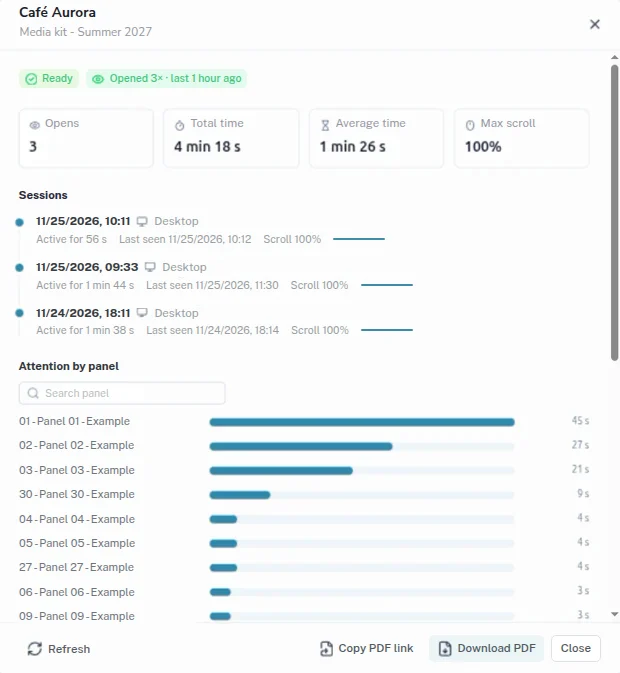
Tracked reading
Know who opened it, how long they read and which panel got attention
Each kit has its own reading report. You see every session, the device and how many seconds the client spent on each panel. It is your cue to call at the right time, talking about the location that caught their interest.
- Opens, total and average reading time
- Sessions with date, time and device
- Attention per panel, in seconds
- WhatsApp and e-mail previews and bots don't count as opens
Readers are told that the link records opens and reading time.
More add-ons
Each add-on solves one step of the sale
From proof of delivery to audience profile, turn add-ons on per account, whenever your sales team needs them.
CMS Integration
Matches your CMS schedule with the measured audience. Every campaign comes out with impacts and count per insertion, no spreadsheets.
- Impacts, count and CPM per campaign
- Campaign report in PDF, ready for the advertiser
- Check-in photos in the campaign report
- Demographics per campaign, with the Demographics add-on
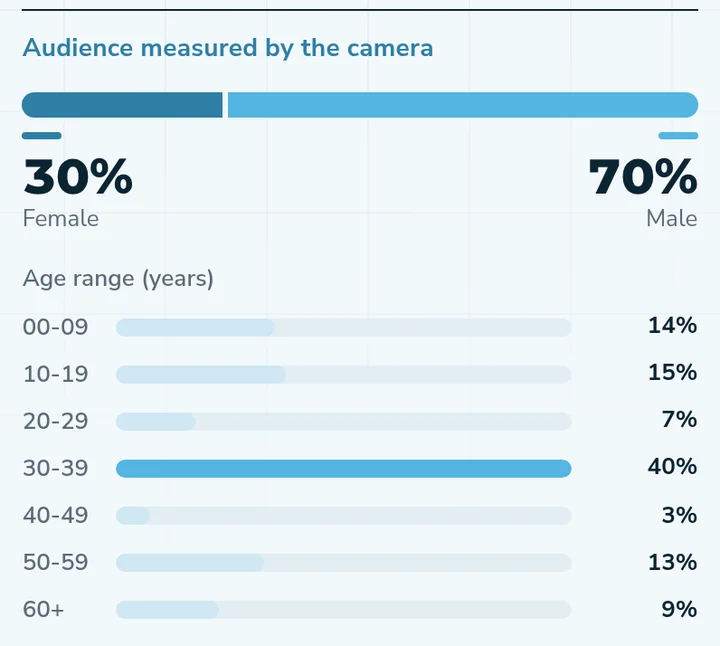
Demographics
Show who passes by, not just how many. Gender and age range of pedestrians, to sell by target audience.
- Gender and age range by hour and by day
- Generations: Alpha, Z, Y, X and Boomers
- Per campaign, with CMS Integration
- Aggregated data, no one is identified
At locations with the camera enabled for demographics.
How we protect privacy →Photo Check-in
The camera records what is playing on the screen. Proof of delivery for the advertiser, without sending anyone to the site.
- Panel image on demand
- One image per spot in the loop
- Video of the full loop
- Download everything at once
On panels where the camera frames the screen.
Pricing
Turn them on when you need them
Add-ons are part of your account's monthly subscription. Start with measurement and turn add-ons on when your sales team asks for them.
- Activated per account by our team
- Try the measurement free for 7 days before you sign
Want to see the add-ons in action?
We'll show you the Dynamic Media Kit, CMS Integration and reports with data from a location being measured.